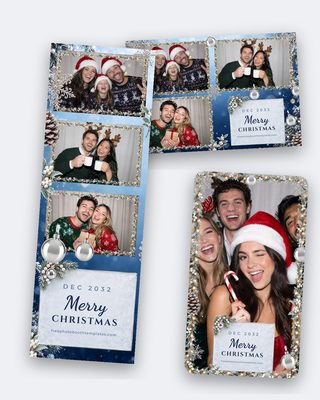
Overview · all 5 layouts
Frosted Winter — Free Christmas Photo Booth Template
Free with your email. We’ll send you new free templates now and then. Unsubscribe any time.
Free licence: personal & commercial use. Details
What’s in the zip
- 2x6 Strip - 3 Photos
- 2x6 Strip - 2 Photos
- 4x6 Landscape - 3 Portrait Photos
- 4x6 Landscape - 3 Landscape Photos
- Phone Overlay 1080x1920
- PDF guide + licence
Fonts: Cinzel, Dancing Script, Montserrat (free Google Fonts)
Premium Want the premium version of this look? 22,000+ layouts on TemplatesBooth, including animated overlays and welcome screens. $19/month, 30-day money-back. See premium layoutsAbout this template
Frosted pine, drifting snow and a soft evergreen palette — festive enough for the office party, calm enough for the CEO.
Frosted Winter is the Christmas photo booth template we reach for when the client is a company rather than a family. Frosted pine branches frame the photos, fine snow drifts across a deep evergreen background, and the headline sits in a clean serif with a hint of gold. It reads unmistakably festive from across the room, but it's calm enough that the managing director won't mind being in the photo — which is what most December corporate bookings are looking for.
Every download includes the full five-layout set: a classic 2x6 strip with three landscape photos, a 2x6 strip with two square photos, a 4x6 landscape with three portrait photos, a 4x6 landscape with three landscape photos and a 1080x1920 phone overlay. All five are layered Photoshop PSD files at 300 dpi, and the overlay ships as a transparent PNG too, so it loads straight into LumaBooth, Snappic, Curator, DSLR Booth or Darkroom Booth.
The text is fully editable. Swap "Merry Christmas" for "Acme Winter Party", type the date, add the hashtag — all separate text layers in free Google Fonts. There's a clear space on the strip footer for a company logo, and because the pine and snow are on their own grouped layers you can thin the branches, remove the snow or shift the evergreen to a corporate navy in a couple of clicks. Free for commercial use, so it can run at every office party you book this December.
What’s included
- 2x6 Strip - 3 Photos1200x1800 px · 300 dpi · psd
- 2x6 Strip - 2 Photos1200x1800 px · 300 dpi · psd
- 4x6 Landscape - 3 Portrait Photos1800x1200 px · 300 dpi · psd
- 4x6 Landscape - 3 Landscape Photos1800x1200 px · 300 dpi · psd
- Phone Overlay 1080x19201080x1920 px · 72 dpi · psd + png
- Branded PDF guideFonts, sizes, how to edit + the licence
Works with
- Photoshop (PSD)
- DSLR Booth
- LumaBooth
- Darkroom Booth
- Snappic
- Curator
How to edit it
- 1
Unzip and open the PSD
Each layout is its own layered Photoshop file. Open the one you need — the 2x6 strip for a classic booth print, the 4x6 for a postcard, or the 1080x1920 overlay for a phone or social booth.
- 2
Install the fonts
The fonts are free Google Fonts. Download them from the links on this page, install, then re-open the PSD so the text layers render correctly.
- 3
Change the text
Double-click the text layers to type the names, date and event. Keep the layer styles — the shadows and outlines are set up to print cleanly.
- 4
Export and load
Save the strip or 4x6 as a PNG or JPG at 300 dpi and load it as your print template. For the overlay, hide the photo placeholder layers and export a transparent PNG.
More free photo booth templates


22,000+ photo booth templates. One membership.
Our free sets cover the big five occasions. When a client asks for something we don't have — a bar mitzvah, a quinceañera, a corporate launch, a 360 booth overlay — TemplatesBooth has it, with a browser editor so you can change every word without opening Photoshop. $19/month or $149/year, cancel anytime, 30-day money-back guarantee.
- PSD, Canva, PNG overlays + native booth-app files
- Browser editor included
- Animated overlays & welcome screens
- 30-day money-back guarantee
$19/month
or $149/year · cancel anytime
Browse TemplatesBoothby TemplatesBooth — the makers of this site